
In today's world of web connect apps issues in your internet connection can cause performance issues with some applications.
There is a simple tool you can run yourself to check your internet connection. Simply head over to http://www.speedtest.net

On that page you just push "Begin Test" to start. It will take 30 to 45 seconds to run usually.
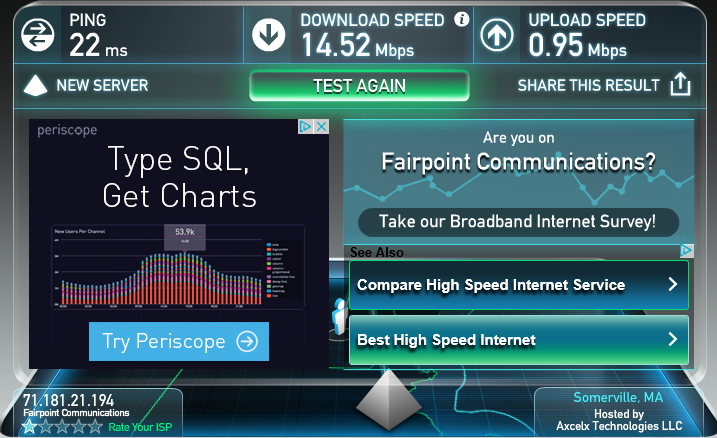
The download and upload speeds should be near to what you have subscribed to from your ISP. In the example above, 15Mbps download and 1Mbps upload. Being a little low or a little above is fine and within an acceptable margin of error. I recommend a minimum of 10Mbps down and 1Mbps up to be able to work from home comfortably.
If you are not reaching the speeds you have subscribed for someone else on your connection could be downloading. There could also be issues with your ISP or somewhere else between you and the site where this test is stored. As long as you have a base 1Mbps upload speed this should not affect you working. This test is not fool proof and is just a quick easy way to check your internet connection.
A ping time of under 50ms is good. between 51ms and 90ms is okay, but anything higher may signal an issue.
You can click on "Share This Result" in the upper right corner under Upload Speed if you want to share the results with Acuity IT or your ISP.
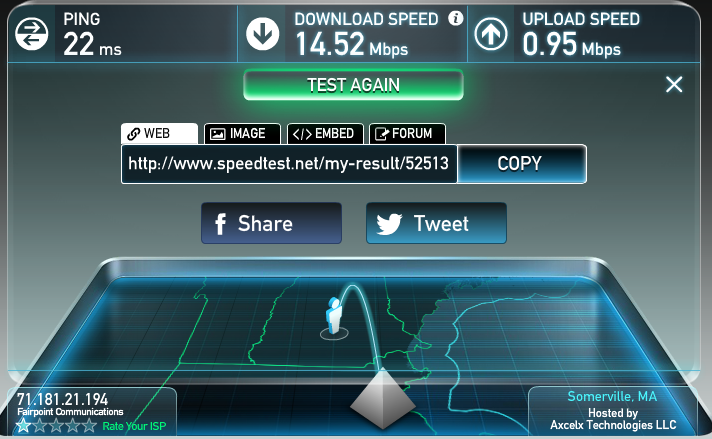
You can then click on "Copy" and paste that link into a ticket or message.